
CyanogenMod Calculator Donate4.3 - Google Play
You'll be able to see results in few seconds.
Publisher Description
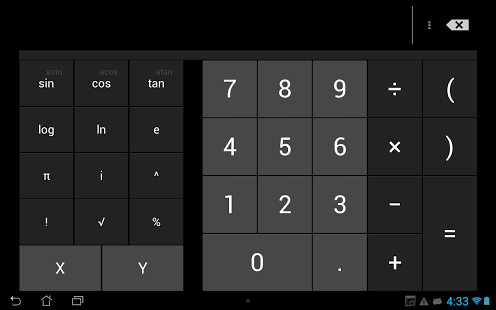
This is exactly the same as the free version. Buy this version only as a way of saying thanks.
Calculator extends the 4 function calculator. It's simple and uncluttered, but gives you access to advanced functions with a swipe. Graphing, matrices, base conversion, and more are at your finger tips, and only when you need them.
Calculator also has a widget, a floating calculator, and 7 (and counting) alternative themes. It also runs on Google Glass.
History:
Calculator was started in June 2012, by Will (myself) and Sean, as developer and designer respectfully. Over 4 months, we added basic support for matrices, graphing, and history, and in October 2012, Calculator became officially included within CyanogenMod (and most custom ROMs soon thereafter). In January 2013, Nick joined the endeavor, redesigning the graph page, hex page, and has, more recently, created all of the available themes. In September 2013, Rudy joined for a short time and greatly improved the matrix logic, adding support for functions, order of operations, and more. And, of course, the vast language support has all been thanks to users. The calculator has been, since its start, open source, and is always looking for more helping hands.
Advice:
Because the app is intended as a full replacement, it's recommended that you disable your default calculator. Go into Settings, Apps, and you will be able to disable it where you would normally find Uninstall (Requires Android 4.1+).
The source code can be downloaded here: https://github.com/Xlythe/android_packages_apps_Calculator/tree/ics
About CyanogenMod Calculator Donate
The company that develops CyanogenMod Calculator Donate is Xlythe. The latest version released by its developer is 4.3.
To install CyanogenMod Calculator Donate on your Android device, just click the green Continue To App button above to start the installation process. The app is listed on our website since 2014-07-06 and was downloaded 0 times. We have already checked if the download link is safe, however for your own protection we recommend that you scan the downloaded app with your antivirus. Your antivirus may detect the CyanogenMod Calculator Donate as malware as malware if the download link to com.donate.calculator3 is broken.
How to install CyanogenMod Calculator Donate on your Android device:
- Click on the Continue To App button on our website. This will redirect you to Google Play.
- Once the CyanogenMod Calculator Donate is shown in the Google Play listing of your Android device, you can start its download and installation. Tap on the Install button located below the search bar and to the right of the app icon.
- A pop-up window with the permissions required by CyanogenMod Calculator Donate will be shown. Click on Accept to continue the process.
- CyanogenMod Calculator Donate will be downloaded onto your device, displaying a progress. Once the download completes, the installation will start and you'll get a notification after the installation is finished.
Program Details
System requirements
Download information
Pricing
Version History
version 4.3
posted on 2014-07-06
version v3.4.1
posted on 2013-06-20
Several fixes and updates
Disclaimer
Official Google Play Link
We do not host CyanogenMod Calculator Donate on our servers. We did not scan it for viruses, adware, spyware or other type of malware. This app is hosted by Google and passed their terms and conditions to be listed there. We recommend caution when installing it.
The Google Play link for CyanogenMod Calculator Donate is provided to you by apps112.com without any warranties, representations or guarantees of any kind, so access it at your own risk.
If you have questions regarding this particular app contact the publisher directly. For questions about the functionalities of apps112.com contact us.
